This is one of the good tweak to delete not hide the Guest Account in Windows XP.For that you must have some basic knowledge of about the Windows Registry.
To go to windows registry option : run > regedit or regedt32.exe (winnt)
Go to windows registry editor as : Run > regedit and locate the following string as >
HKEY_LOCAL_MACHINE\SAM\SAM.
Then you have to give permission by right-click the second SAM Key, choose "Permissions..." highlight the "Administrator" and click the "Full Control" .
Apply and sometimes ,restart the registry simply by closing and re-opening it.


 If above tweak doesn't work, try this tweak as :
Highlight the second SAM Key, right-click it and choose "Permissions...".
Highlight the user (Administrators) and then click the "Advanced" button, highlight Administrators again then click the "Edit..." button.
Place a tick in "Full Control", click "Apply" and "OK", then "OK" then close and re-open Registry to get to the extra sections.
Then make your way here in the Registry:-
HKEY_LOCAL_MACHINE\SAM\SAM\Domains\Account\Users\0 00001F5
Double-click "V" then make your way to "Offset 0178" and replace the number "47" with "42".
Then go and have a look at Control Panel\User Accounts
All this does is hide the Guest Account from view.
This next part has only been tested on my computer which uses XP PRO
If you want to completely remove the Guest Account you will need to delete the Data Value from the Binary Name "V" then copy and paste this reg file info into Notepad, save it onto your Desktop as NoGuest.reg and double-click it:-
--------------------Copy and Paste within the lines---------------------------
Windows Registry Editor Version 5.00
[HKEY_LOCAL_MACHINE\SAM\SAM\Domains\Account\Users\0 00001F5]
"V"=hex:00,00,00,00,b0,00,00,00,02,00,01,00,b0,00, 00,00,0a,00,00,00,00,00,00,\
00,bc,00,00,00,00,00,00,00,00,00,00,00,bc,00,00,00 ,70,00,00,00,00,00,00,00,\
2c,01,00,00,00,00,00,00,00,00,00,00,2c,01,00,00,00 ,00,00,00,00,00,00,00,2c,\
01,00,00,00,00,00,00,00,00,00,00,2c,01,00,00,00,00 ,00,00,00,00,00,00,2c,01,\
00,00,00,00,00,00,00,00,00,00,2c,01,00,00,00,00,00 ,00,00,00,00,00,2c,01,00,\
00,00,00,00,00,00,00,00,00,2c,01,00,00,00,00,00,00 ,00,00,00,00,2c,01,00,00,\
08,00,00,00,01,00,00,00,34,01,00,00,04,00,00,00,00 ,00,00,00,38,01,00,00,04,\
00,00,00,00,00,00,00,3c,01,00,00,04,00,00,00,00,00 ,00,00,40,01,00,00,04,00,\
00,00,00,00,00,00,01,00,14,80,90,00,00,00,a0,00,00 ,00,14,00,00,00,44,00,00,\
00,02,00,30,00,02,00,00,00,02,c0,14,00,44,00,05,01 ,01,01,00,00,00,00,00,01,\
00,00,00,00,02,c0,14,00,ff,ff,1f,00,01,01,00,00,00 ,00,00,05,07,00,00,00,02,\
00,4c,00,03,00,00,00,00,00,14,00,1b,03,02,00,01,01 ,00,00,00,00,00,01,00,00,\
00,00,00,00,18,00,ff,07,0f,00,01,02,00,00,00,00,00 ,05,20,00,00,00,20,02,00,\
00,00,00,18,00,ff,07,0f,00,01,02,00,00,00,00,00,05 ,20,00,00,00,24,02,00,00,\
01,02,00,00,00,00,00,05,20,00,00,00,20,02,00,00,01
-------------------End Copy and Paste---------------------------------
Once you have copied, pasted and entered the reg file above into the registry, make your way back to here in the registry:-
HKEY_LOCAL_MACHINE\SAM\SAM\Domains\Account\Users\N ames\Guest
and delete the "Guest" Key.
ALWAYS BACKUP YOUR REGISTRY BEFORE CHANGING SETTINGS, BECAUSE ONCE DONE CAN'T BE UNDONE !
If you are new to windows registry follow as :


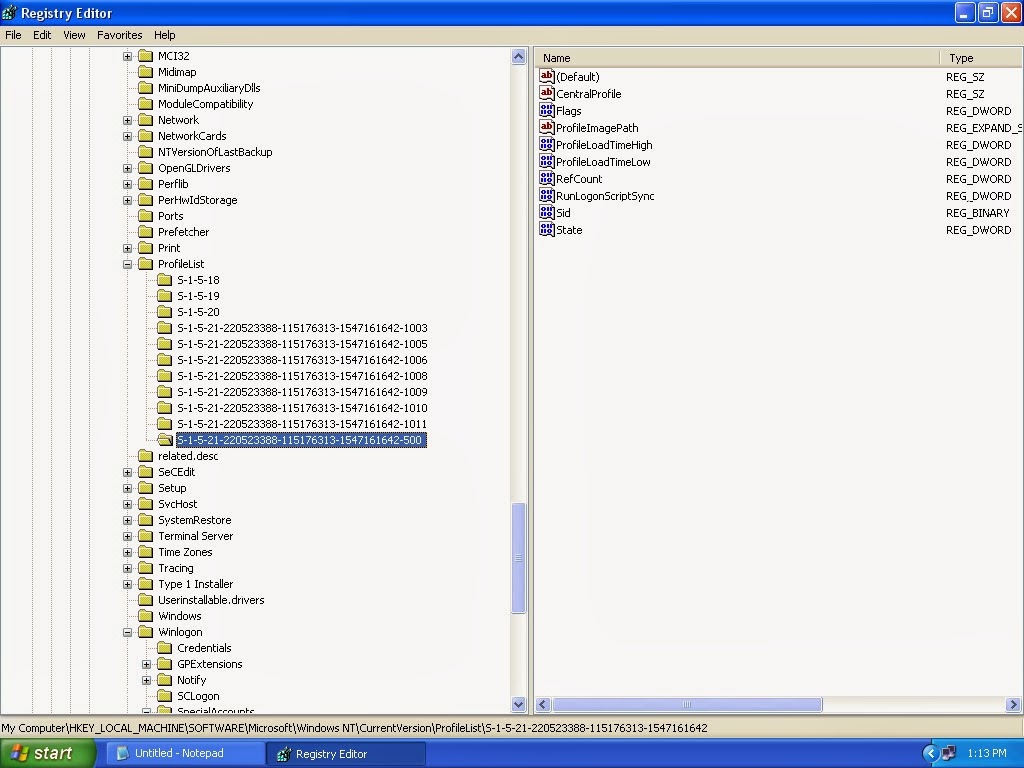

 If above tweak doesn't work, try this tweak as :
Highlight the second SAM Key, right-click it and choose "Permissions...".
Highlight the user (Administrators) and then click the "Advanced" button, highlight Administrators again then click the "Edit..." button.
Place a tick in "Full Control", click "Apply" and "OK", then "OK" then close and re-open Registry to get to the extra sections.
Then make your way here in the Registry:-
HKEY_LOCAL_MACHINE\SAM\SAM\Domains\Account\Users\0 00001F5
Double-click "V" then make your way to "Offset 0178" and replace the number "47" with "42".
Then go and have a look at Control Panel\User Accounts
All this does is hide the Guest Account from view.
This next part has only been tested on my computer which uses XP PRO
If you want to completely remove the Guest Account you will need to delete the Data Value from the Binary Name "V" then copy and paste this reg file info into Notepad, save it onto your Desktop as NoGuest.reg and double-click it:-
--------------------Copy and Paste within the lines---------------------------
Windows Registry Editor Version 5.00
[HKEY_LOCAL_MACHINE\SAM\SAM\Domains\Account\Users\0 00001F5]
"V"=hex:00,00,00,00,b0,00,00,00,02,00,01,00,b0,00, 00,00,0a,00,00,00,00,00,00,\
00,bc,00,00,00,00,00,00,00,00,00,00,00,bc,00,00,00 ,70,00,00,00,00,00,00,00,\
2c,01,00,00,00,00,00,00,00,00,00,00,2c,01,00,00,00 ,00,00,00,00,00,00,00,2c,\
01,00,00,00,00,00,00,00,00,00,00,2c,01,00,00,00,00 ,00,00,00,00,00,00,2c,01,\
00,00,00,00,00,00,00,00,00,00,2c,01,00,00,00,00,00 ,00,00,00,00,00,2c,01,00,\
00,00,00,00,00,00,00,00,00,2c,01,00,00,00,00,00,00 ,00,00,00,00,2c,01,00,00,\
08,00,00,00,01,00,00,00,34,01,00,00,04,00,00,00,00 ,00,00,00,38,01,00,00,04,\
00,00,00,00,00,00,00,3c,01,00,00,04,00,00,00,00,00 ,00,00,40,01,00,00,04,00,\
00,00,00,00,00,00,01,00,14,80,90,00,00,00,a0,00,00 ,00,14,00,00,00,44,00,00,\
00,02,00,30,00,02,00,00,00,02,c0,14,00,44,00,05,01 ,01,01,00,00,00,00,00,01,\
00,00,00,00,02,c0,14,00,ff,ff,1f,00,01,01,00,00,00 ,00,00,05,07,00,00,00,02,\
00,4c,00,03,00,00,00,00,00,14,00,1b,03,02,00,01,01 ,00,00,00,00,00,01,00,00,\
00,00,00,00,18,00,ff,07,0f,00,01,02,00,00,00,00,00 ,05,20,00,00,00,20,02,00,\
00,00,00,18,00,ff,07,0f,00,01,02,00,00,00,00,00,05 ,20,00,00,00,24,02,00,00,\
01,02,00,00,00,00,00,05,20,00,00,00,20,02,00,00,01
-------------------End Copy and Paste---------------------------------
Once you have copied, pasted and entered the reg file above into the registry, make your way back to here in the registry:-
HKEY_LOCAL_MACHINE\SAM\SAM\Domains\Account\Users\N ames\Guest
and delete the "Guest" Key.
ALWAYS BACKUP YOUR REGISTRY BEFORE CHANGING SETTINGS, BECAUSE ONCE DONE CAN'T BE UNDONE !
If you are new to windows registry follow as :
If above tweak doesn't work, try this tweak as :
Highlight the second SAM Key, right-click it and choose "Permissions...".
Highlight the user (Administrators) and then click the "Advanced" button, highlight Administrators again then click the "Edit..." button.
Place a tick in "Full Control", click "Apply" and "OK", then "OK" then close and re-open Registry to get to the extra sections.
Then make your way here in the Registry:-
HKEY_LOCAL_MACHINE\SAM\SAM\Domains\Account\Users\0 00001F5
Double-click "V" then make your way to "Offset 0178" and replace the number "47" with "42".
Then go and have a look at Control Panel\User Accounts
All this does is hide the Guest Account from view.
This next part has only been tested on my computer which uses XP PRO
If you want to completely remove the Guest Account you will need to delete the Data Value from the Binary Name "V" then copy and paste this reg file info into Notepad, save it onto your Desktop as NoGuest.reg and double-click it:-
--------------------Copy and Paste within the lines---------------------------
Windows Registry Editor Version 5.00
[HKEY_LOCAL_MACHINE\SAM\SAM\Domains\Account\Users\0 00001F5]
"V"=hex:00,00,00,00,b0,00,00,00,02,00,01,00,b0,00, 00,00,0a,00,00,00,00,00,00,\
00,bc,00,00,00,00,00,00,00,00,00,00,00,bc,00,00,00 ,70,00,00,00,00,00,00,00,\
2c,01,00,00,00,00,00,00,00,00,00,00,2c,01,00,00,00 ,00,00,00,00,00,00,00,2c,\
01,00,00,00,00,00,00,00,00,00,00,2c,01,00,00,00,00 ,00,00,00,00,00,00,2c,01,\
00,00,00,00,00,00,00,00,00,00,2c,01,00,00,00,00,00 ,00,00,00,00,00,2c,01,00,\
00,00,00,00,00,00,00,00,00,2c,01,00,00,00,00,00,00 ,00,00,00,00,2c,01,00,00,\
08,00,00,00,01,00,00,00,34,01,00,00,04,00,00,00,00 ,00,00,00,38,01,00,00,04,\
00,00,00,00,00,00,00,3c,01,00,00,04,00,00,00,00,00 ,00,00,40,01,00,00,04,00,\
00,00,00,00,00,00,01,00,14,80,90,00,00,00,a0,00,00 ,00,14,00,00,00,44,00,00,\
00,02,00,30,00,02,00,00,00,02,c0,14,00,44,00,05,01 ,01,01,00,00,00,00,00,01,\
00,00,00,00,02,c0,14,00,ff,ff,1f,00,01,01,00,00,00 ,00,00,05,07,00,00,00,02,\
00,4c,00,03,00,00,00,00,00,14,00,1b,03,02,00,01,01 ,00,00,00,00,00,01,00,00,\
00,00,00,00,18,00,ff,07,0f,00,01,02,00,00,00,00,00 ,05,20,00,00,00,20,02,00,\
00,00,00,18,00,ff,07,0f,00,01,02,00,00,00,00,00,05 ,20,00,00,00,24,02,00,00,\
01,02,00,00,00,00,00,05,20,00,00,00,20,02,00,00,01
-------------------End Copy and Paste---------------------------------
Once you have copied, pasted and entered the reg file above into the registry, make your way back to here in the registry:-
HKEY_LOCAL_MACHINE\SAM\SAM\Domains\Account\Users\N ames\Guest
and delete the "Guest" Key.
ALWAYS BACKUP YOUR REGISTRY BEFORE CHANGING SETTINGS, BECAUSE ONCE DONE CAN'T BE UNDONE !
If you are new to windows registry follow as :


 Life is... very unpredictable
I have always been a person who likes to plan much ahead .But Living with the unpredictable nature of life is not an exciting event.Sometimes It does and ,can lead to new adventures, meeting new people or, moving to new places.
But, it can also be incredibly difficult to live with ,because it has had such a huge and challenging impact on our life , and also It is very hard to predict.
Over the years this has resulted in a lot of stress, a lot of arguments and a lot of upset but slowly I have learnt how to deal with it and how to make it work out. I think! And on a bad day that really helps!
As this new venture begins I have never felt quite so calm, prepared and ready for . Let's hope it stays that way!
Wish to share your part , welcome !
Life is... very unpredictable
I have always been a person who likes to plan much ahead .But Living with the unpredictable nature of life is not an exciting event.Sometimes It does and ,can lead to new adventures, meeting new people or, moving to new places.
But, it can also be incredibly difficult to live with ,because it has had such a huge and challenging impact on our life , and also It is very hard to predict.
Over the years this has resulted in a lot of stress, a lot of arguments and a lot of upset but slowly I have learnt how to deal with it and how to make it work out. I think! And on a bad day that really helps!
As this new venture begins I have never felt quite so calm, prepared and ready for . Let's hope it stays that way!
Wish to share your part , welcome !
 But after these ODDS , we still have to live ! live and carry on .....


.jpg)


